Grid and Plane Setup
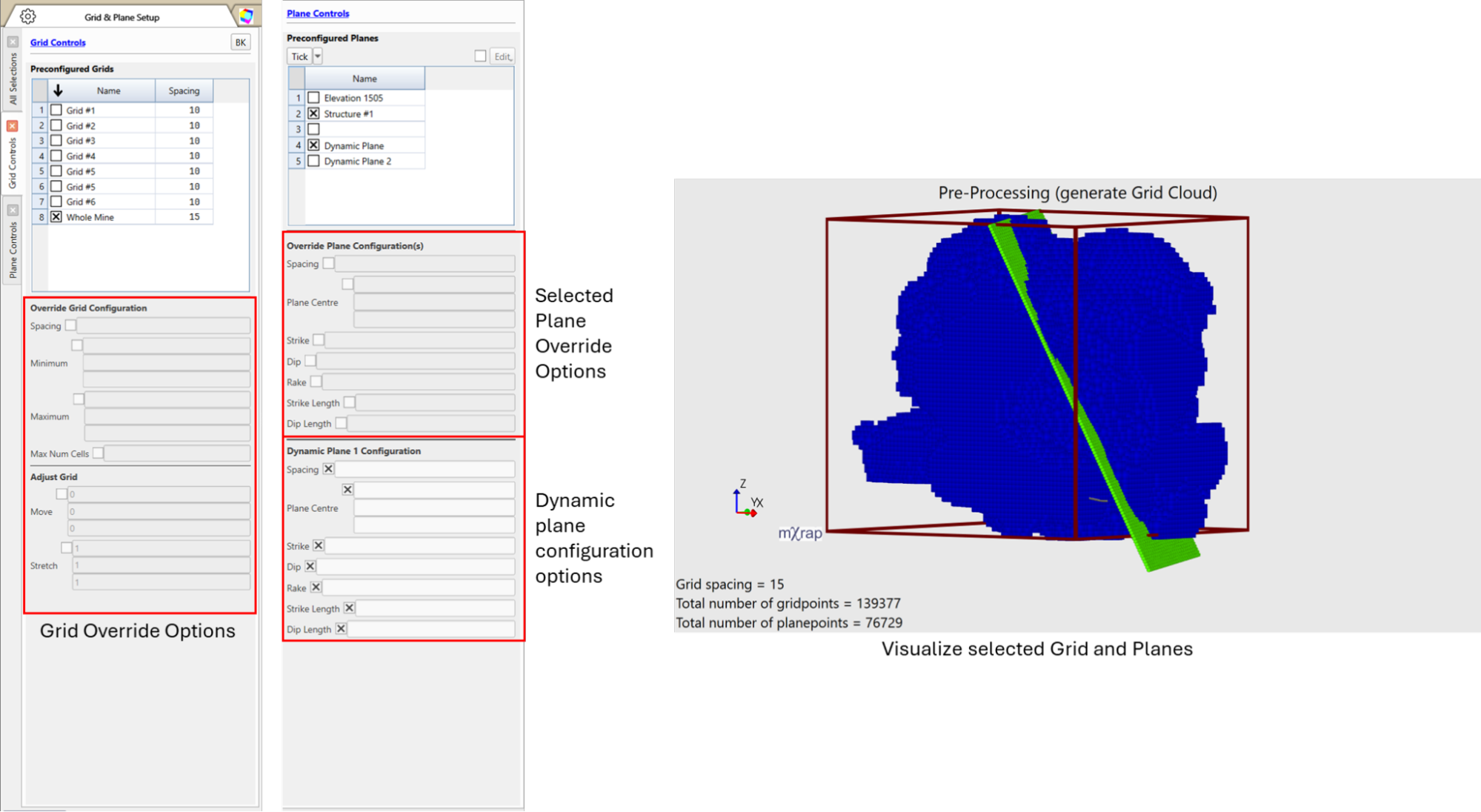
The Grid and Plane Setup window is used to control which grid and planes are active for analysis across the application. Multiple planes can be selected depending upon the analysis objective. Use the 3D view to verify the spatial coverage of selected grid and planes prior to commencing the analysis.
Saved grid definitions are available under:
Grid and Plane Setup → Panels → Grid Controls
Saved plane definitions are available under:
Grid and Plane Setup → Panels → Plane Controls
Selected grids and planes can be visualized in:
Grid and Plane Setup → 3D Views
Temporary Overrides
Grid Overrides
The selected grid can be temporarily modified for exploratory or scenario-based analysis using:
- Grid and Plane Setup → Panels → Grid Controls
Overrides apply only to the current analysis session and do not modify the saved grid definition.
There is a maximum limit of 1e6 on the gridpoints for the analysis. If the gridpoints exceed the maximum limit, a blocked message will be displayed at the bottom right corner of the status bar and in the mXrap System Status window. Adjust the grid size or spacing to continue with the analysis. You can also increase the limit but this risks crashing the application, especially increasing the limit higher than 1e7.
Plane Overrides and Dynamic Planes
In addition to predefined planes, there are dynamic plane options for ad hoc analysis.
- Enable dynamic planes via:
Grid and Plane Setup → Panels → Plane Controls - Configure dynamic plane parameters directly within the control panel
Predefined planes can also be temporarily adjusted using the Override Plane Configuration(s) option.
- Define grids large enough to fully capture the spatial extent of relevant seismic and auxiliary data.
- Use planes selectively and with clear purpose, particularly when representing known geological structures.
- Always verify grid and plane coverage in the 3D View prior to running analyses.
- Use overrides for exploratory analysis and retain predefined grids and planes for standardized and repeatable workflows.