Intact Rock
Refers to Lab tests (borehole and grab samples) and index tests.
Supported Data Types
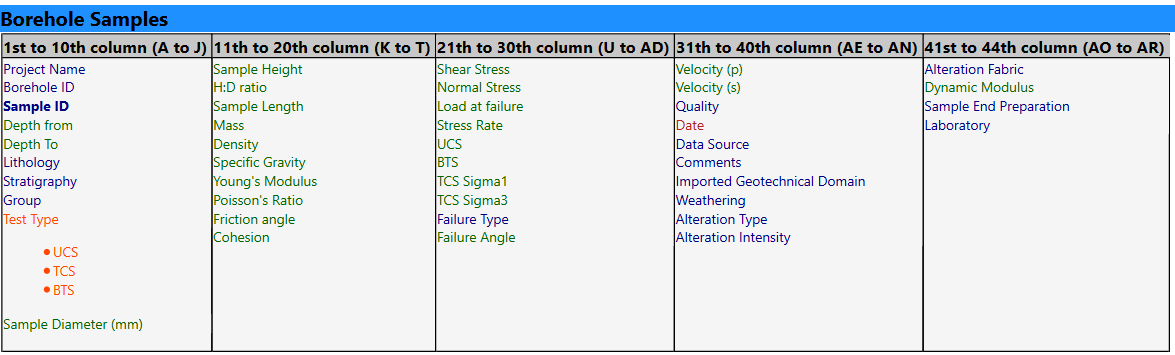
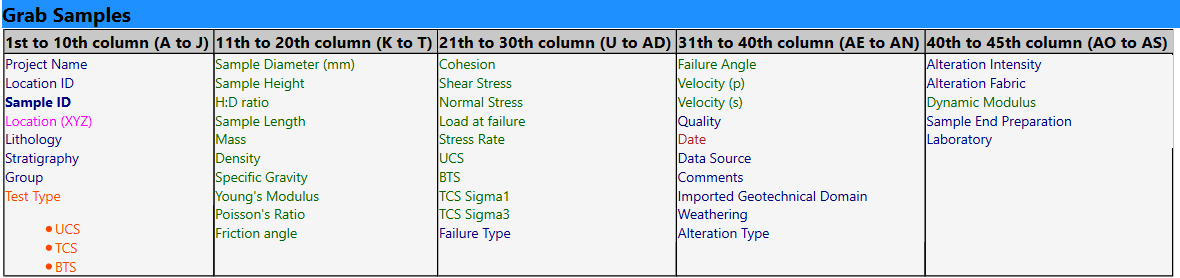
- Lab tests from borehole or grab samples: UCS (uniaxial), TCS (triaxial), BRE (tension)
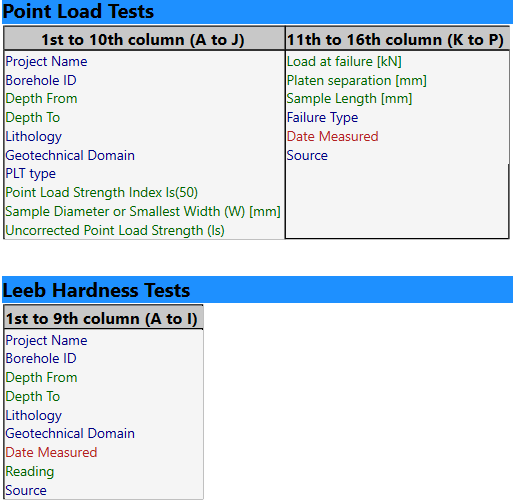
- Index tests: Point load tests, Leeb tests
CSV TEMPLATES FORMATS and DATA TYPE
- Files imported must be in .csv format (auto-import with customized features OR manual csv import)
- Where there is no data available for the remaining columns leave blank.
- Columns in the .csv file must be in the order specified in the sections below.
- Columns in the specified format, according to this color code:
- Number column (green)
- Text column (blue)
- Specific Text column (category) - (orange)
- Date column : yyyy-MM-dd (red)
- Point columns : X Y Z (3 number columns) (pink)


Key Features
Documentation in progress
Auto-import of database or Manual csv import (Boreholes samples & Grab samples)
Import lab test data:
Import index test :
Video coming soon
Visualise intact strength laboratory test results along boreholes and filter the data

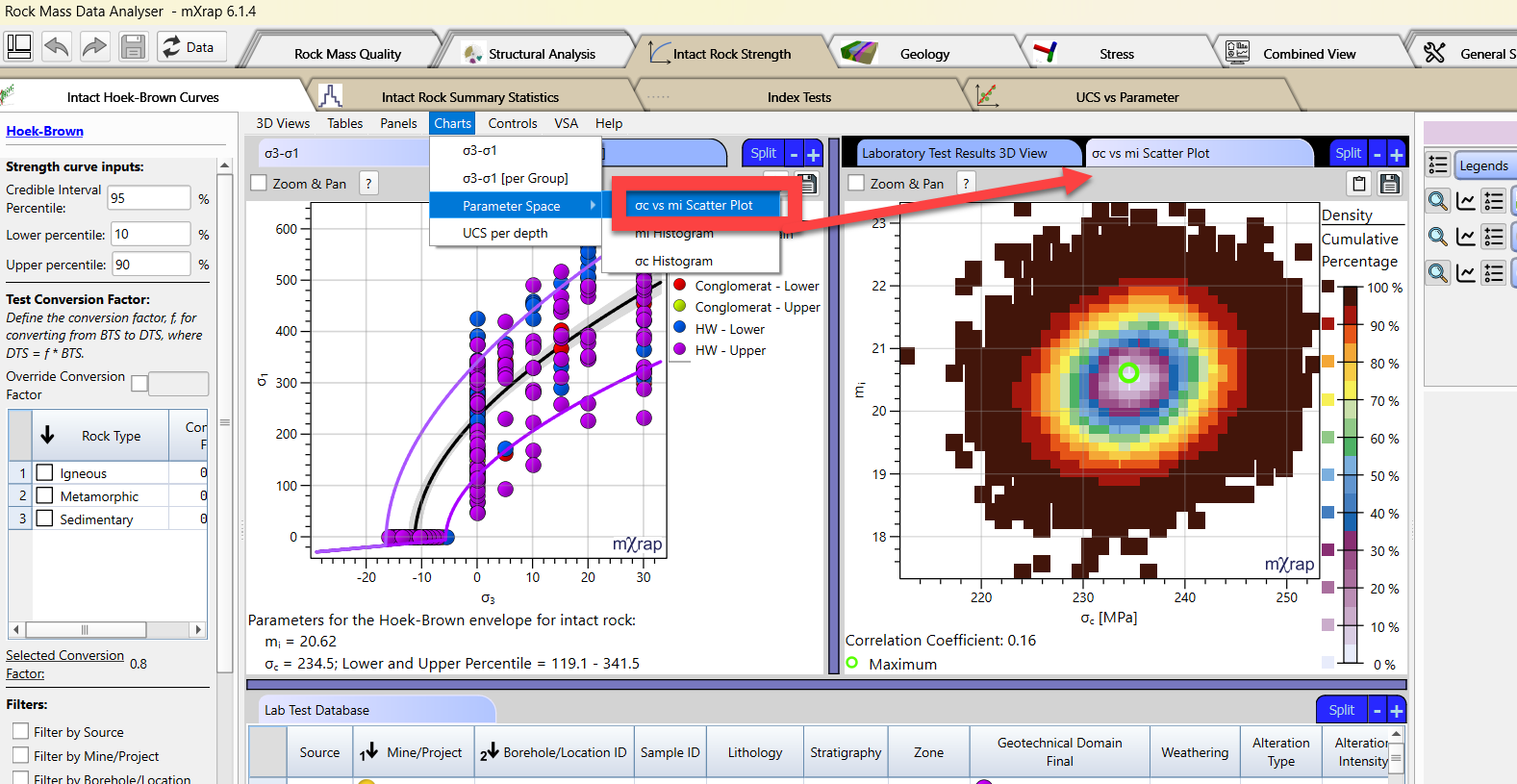
Generate Hoek-Brown failure envelopes with grouping options with different fitting options
-
Obtain mi and UCS from the best-fit
-
Confidence intervals of the mean and distribution of the data around the curve (lower and upper percentiles)

Hoek-Brown best-fit curves: parameters and data distribution -
Options for fitting algorithm and more advanced fitting options
-
Visualize the UCS distribution on chart
-
Generate equivalent Mohr-Coulomb criterion

Hoek-Brown best-fit curves: algorithm option, UCS distribution and equivalent Mohr-Coulomb -
For all data or per groups (lithologies, geotechnical domains, or both)

Hoek-Brown curves based on UCS, TCS and BTS test results per group and combined
Bayesian Statistics of UCS and mi from the Hoek-Brown curves
Visualize the solution parameters

These can help you point out some issues regarding your data. For example, no triaxial tests results in a random mi value (left case in picture below). Very few triaxial tests might results in a irregular mi distribution. Our confidence into the resulting mi should at the maximum very low (middle case in the picture below) Numerous triaxial tests for a variety of confinement stresses (sigma3) results in a normal distribution of mi, in which we can have higher confidence (right case in the picture below)

Produce a summary report (html)
You can export a report that will export in a html format all the statistics summary table (UCS, E, density, TCS, BTS, Hoek-Brown parameters) and the 3D view and chart from the lab tests. All the filters used to produce the stats are also displayed into the report. Open the Report Controls panel to choose the folder in which the report will be exported and set its name. To export the report, press the Generate Report button.
To have a look at a preview of the report, open the Preview html view in mXrap.

To save the report in a pdf, open the html in your browser and use the option to save as pdf.
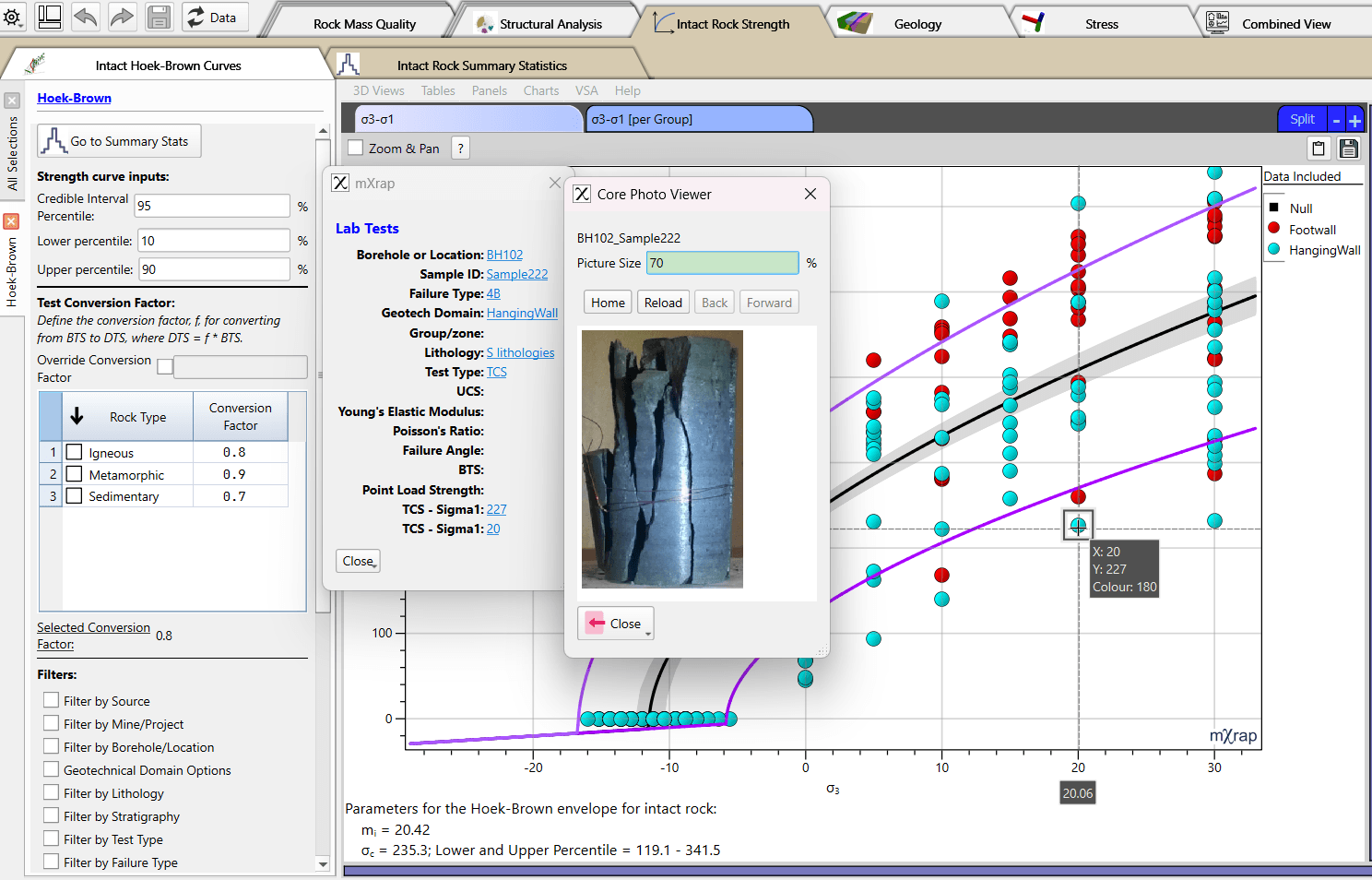
Core photo viewer of sample directly on charts (by double-clicking on point)
Double-click on any point on the sigma3-sigma1 chart to have the pop-up of the lab tests photo (if available) and info about this sample. Please contact us to set up the links to your lab tests photo.
Per default, the photos will be linked if:
- Stored in your root under _#Data/Rock Mass Data Import/CorePhoto/LabTests/BHID/SampleID.
- The photo of the sample should be named the same as the Sample ID imported in mXrap, in the folder named by the BoreholeID.
- png format
That can be changed: reach out to us if your photo are stored in another format.

Obtains summary statistics with tables and histogram of all your intact rock parameters (UCS, BTS, E, v, density) grouped or combined
Use the Grouping panel to group data per geotechnical domains, lithologies, or both.
The UCS of bins are autp-calculated, but can be override in the controls of the panel.

The summary stats table includes basics statistics, but also confidence levels and user-defined Xth percentile.

Visualize in 3D Index Tests (Leed Hardness Tests and Point Load Test) and obtains summary stats
Choose the Index type that you want to investigate in the Filters panel. Look at the 3D to locate your samples. The Chart shows the histogram of your data - which you can groupy by domain or lithologies (in the Grouping panel). The summary stats of the index tests shows in the Summary Stats Index Tests table.

Establish equation between index tests (Leed Hardness Tests and Point Load Test) and UCS lab tests results
Assess the maximm distance to a index tests from a UCS test to match in the Analysis Controls panel. The relation will show on the Index Test vs UCS chart and the resulting equation will display in the table.

Investigate relation between UCS and other parameters (E, P- S- wave velocity, Dynamic Modulus)
Assess the relation between the UCS and diffenrent other parameters : depth, Young's Modulus, Dynamic Modulus, P-waves velocity, S-waves velocity in charts and in tables. The tables shows the best-fit equation and the R-squared associated.
You can group your data using the Grouping panel to assess the relation/equation per geotechnical domain, lithologies, or both.

You can use the different tables to also see the variation of the different parameters from a lithology / geotechnical domain onw from another. You can use the grouping options, or just change the markerstyle in the table and use the filters. See an example below that shows the ORE have typical lower UCS and have a wider range of Young's Modulus in comparison to the lithology INTRUSIVE, which has higher Young's Modulus and a wide range of UCS.

Overview video
Theory
Hoek-Brown fit
Documentation coming soon
FAQ
Q1: Can I import the PLT results as a UCS?
A1: It is not recommended. We recommend to import your raw PLT data and therefore establish a relation with the UCS measured in laboratory.