Faults
Purpose
Import structural surveys for visualisation and calculating fault parameters.
Steps
- Import Surveys (if required).
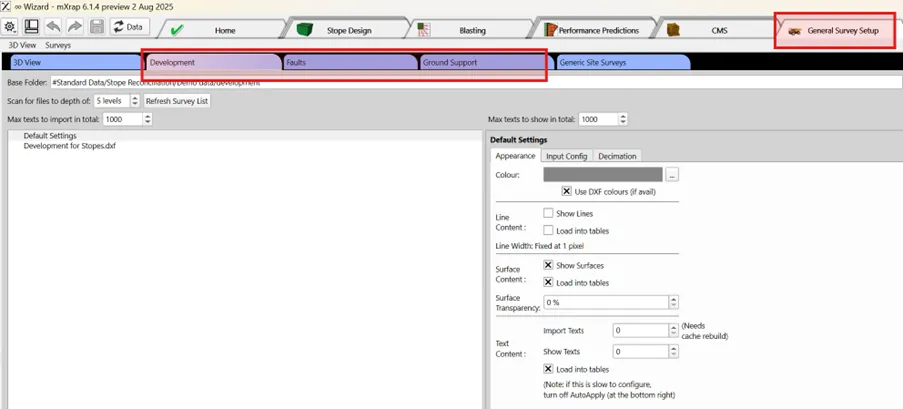
-
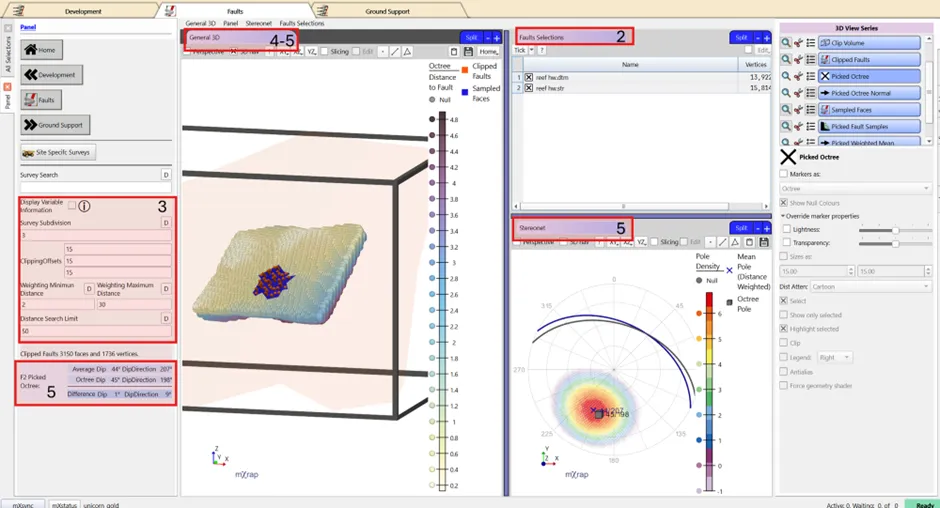
Tick the faults critical to stope performance from the table view.
-
Adjust survey subdivision clipping box and weightings and search distance (if required).
-
Check in 3D Viewer - Validate mapping computations.
-
F2 on an octree to see the structural sampling, the octree and structural orientation in the stereonet as well as the difference in Dip/Dip direction in the panel.
dica
Step 1 is only required if surveys haven't already been built in the survey tool.
dica
Step 3 is rarely required but may be adjusted for specific case e.g. to increase subdivision and decrease clipping if there a lot of faults or increase search limits for very large stopes and sparse faults.
Video
Explains the Faults window layout and tools in the stope reconciliation Wizard App.