About mXrap

The About mXrap utility appears in your Start Menu after installation. This is a small tool which helps us to diagnose any problems you may be experiencing.
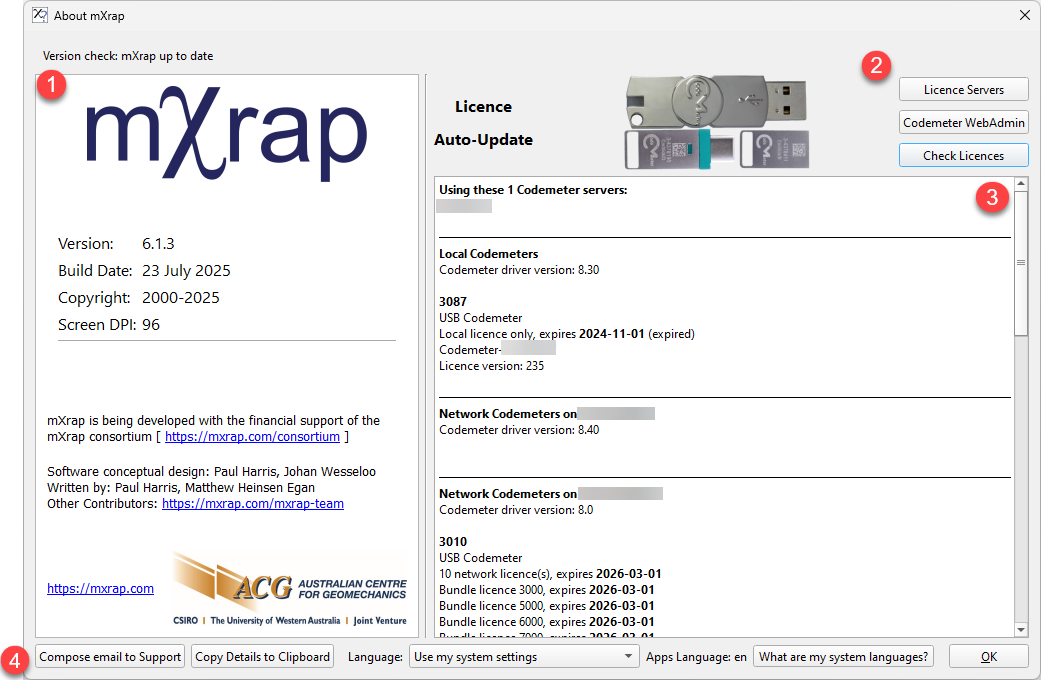
1 - Version information
Shows your currently installed version. The latest available version is 6.1.4.
Version Check
A banner will appear above if a newer version is available for download.
2 - Licence management
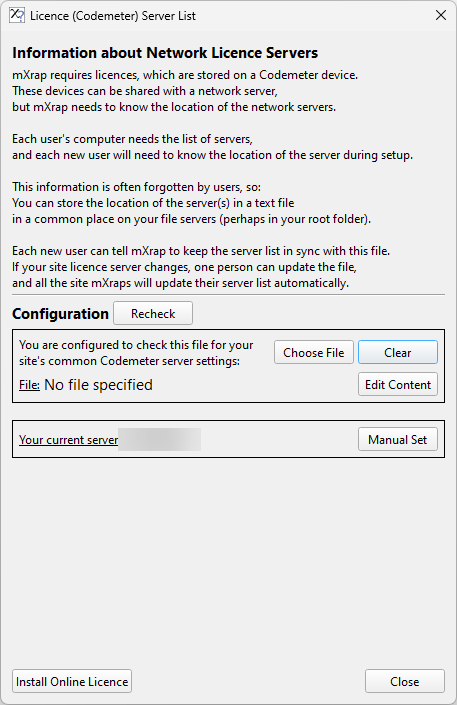
Licence servers
- CodeMeter WebAdmin: Access the
Wibu CodeMeter WebAdmin interface - Check Licences: Force the runtime to refresh licence status
Configure your network licence server connection using the following options:
Configuration
| Action | Description |
|---|---|
| Choose File | Select a plain text file containing server addresses (IP or hostname) - one per line |
| Clear | Remove file reference (file remains on disk) |
| Edit Content | Open the selected file in your default text editor |
Example server configuration file:
title="licence-servers.txt"
555.555.5.555
server.company.com
hostname
| Action | Description |
|---|---|
| Manual Set | Directly enter your network licence server IP/URL/hostname |
| Install Online Licence | Configure online licensing - see Online Licence Setup |
| Close | Close the configuration window |
3 - Licence Status
observação
Only sections relevant to your specific deployment will be displayed.
Server Information
- Using these Codemeter servers: Shows network licence server addresses and 4-digit IDs (matching USB dongle numbers or software licence IDs), plus diagnostic bundles
- Network CodeMeters: Displays resolved network licence server addresses
- Local CodeMeters: Lists physical dongles connected to your device (4-digit IDs match USB dongle labels)
4 - Support & System Options
| Action | Description |
|---|---|
| Email Support | Opens default email client with pre-populated message to and copies CmDust log to clipboard |
| Copy Details | Runs CmDust and copies diagnostic log to clipboard without opening email |
| Language | Change display language for all mXrap components |
cuidado
Some translations may be incomplete or contain inaccuracies.