mXrap 6.1.3 - Release notes and Changelogs

This version brings a large number of bugfixes and user experience improvements.
You will be prompted to upgrade by a yellow banner at the top of the Apps window. Follow the link to download and install.
What's New for Users - mXrap 6.1.3
Release Date: 23 July 2025
Overview
6.1.3 is a large maintenance release, with over 100 changes that will directly improve the user experience, and many more lower-level improvements not listed here.
Changes and Bugfixes
- Surveys and CSV files: Properly detect errors when writing files to a full disk (and other problems writing to file systems).
In the past, files could potentially be partially written to disk, resulting in corrupted data files.
-
Faster start-up thanks to streamlining Codemeter interactions.
-
Double-check Bundle licences when "Reload App" is manually pressed.
-
"Cancel Shutdown" wasn't working when waiting for Actions to complete.
-
Handle missing root folders - the Apps window would not appear if there was an error checking the root folder.
-
Show a better error message when a root folder can't be found (the path may have been adjusted to remove multiple spaces in the path).
-
The current root folder is shown at the bottom of the window - great for users who have multiple root folders.
-
3D View
-
Users can now use Spacebar to toggle chosen surveys in the Survey panel.
-
Adjusted the FLY behaviour so it does not fly to completely transparent points. Users can still pick transparent points.
-
Selections:
- Bugfix for the undo/redo behaviour of selection boxes.
- Bugfix for rendering Selection boxes: the box edges would sometimes change to the incorrect size.
-
Slicing:
- Improve the on-screen slicing controls: they would appear too small on 4K screens.
- Correctly handle loading incomplete slice planes.
- The default slicing mode is now "Around" rather than "Above/Below".
- More intuitive behaviour when enabling slicing while the plane configuration is incomplete.
-
Rendering points:
- Correctly select only the visible points when the slicing tool is active.
- Bugfix for rendering points, sometimes they would render briefly without applying the clipping.
- Correctly reset the viewport clipping range when a points series becomes visible (points would sometimes be incorrectly hidden), and after clicking the Home button.
-
Rendering lines:
-
Bugfix for rendering thick lines: they would sometimes appear twisted.
-
Fix a crash when loading human language translations before initialisation.
-
Bugfix, Annotations would crash if the line was too short.
-
-
-
Panels:
- Allow users to type (e.g.)
1e10. It could previously block partially typed numbers, as1eis considered invalid. - Show disabled Tableviews in the panel as greyed-out.
- Improved the focus behaviour of variable input boxes when the input is disabled.
- Properly catch errors loading Panel Bookmark data.
- Allow users to type (e.g.)
-
Tableviews:
- Cell editing improvements - changes are saved when the cell focus is lost.
- Users can now edit the boolean columns easier: typing
1or0, orT,F. Or Spacebar will toggle the cell. - Correctly use the Min/Max range for date-based marker styles (it was incorrectly using the number min/max).
-
Charts:
- Only highlight selected points if those points are displayed.
- Draw the hover-labels towards the centre of the chart, so they are not clipped to the edge of the chart.
-
Surveys:
- Survey Import now supports Datamine Triangulations, for pairs of files named
x_tr.dmandx_pt.dm - Survey Import now supports
OBJ,PLYandSTLfile formats. - Fixes for the
STRformat import. - Deswik importer correctly parses dates in the form
YYYY-MM-dd hh:mm:ssZ - Correctly reload a newly-created cache file after "Reload Data" is clicked.
- Survey Import now supports Datamine Triangulations, for pairs of files named
-
mXsync:
- The built-in mXsync will automatically reload the configuration and data when a patch is applied, AND force tools to recalculate with the new libraries.
- Consistently use yyyy-mm-dd dates in the user interface.
-
Webforms Server: Add option to disable server autostart.
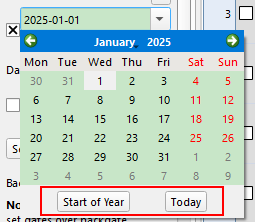
Date Variables now has a "Start of Year" and "Today" button

Loading a Workspace via the workspace button is more logical.
Double-clicking on another workspace will reload the app to behave as if it had been loaded from scratch.
- Switch window layouts
- Reset variable values and columns back to defaults
- Rerun initial Actions
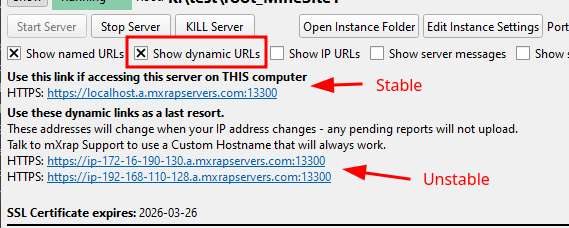
The Webforms GUI now helps you to choose the stable URLs to use.
In general, you should not use URLs based on Dynamic IP addresses, as any pending reports will become stuck in the web browser when that IP address changes.
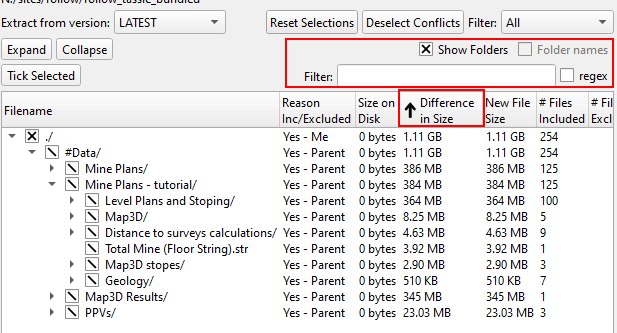
mXsync's file list interface has been much improved - you can now sort by file sizes and search for filenames.
What's New for Developers - mXrap 6.1.3
Release Date: 23 July 2025
-
Actions and Popups:
-
Support playing audio from bundled files - meaning you can bundle your audio resources directly in the bundle.
-
Warn App Developer if Action button configuration is changed while the Action is still executing (also applies to Actions that are listening for Reload-Data triggers).
-
Tablecalc and Rowcalc:
- Support 64-bit integers (as
JS BigInt) - Bugfix: Ensure output Filter columns are correctly sized.
- Support 64-bit integers (as
-
Human Language Translations:
- Feature to hide all translatable texts with "Malkovich" - to highlight texts that have not been wrapped with
mxTr.fmt() - Order menus by the original English spelling for consistent ordering.
- Feature to hide all translatable texts with "Malkovich" - to highlight texts that have not been wrapped with
-
Redirection / Renaming:
- Redirection now ignores "Ghost connections" - i.e. they will only redirect actively used connections. This helps limit the number of pointless changes when rearranging tools.
- Bugfixes for Redirections: some connections were incorrectly adjusted.
-
HTMLViews can now load external http/https resources (e.g. images from external servers).
-
Import CSV can now read files within "Bundled Zips", e.g. a File stored in a zip:
Settings/Folder/Batch.zip/Data.csvcan be read via the pathSettings/Folder/Batch/Data.csv(this will be read-only). And, if that file exists directly on the filesystem, then the file becomes readable and writable. This is useful for bundling data files with your App, AND still have the option to customise for site if necessary. -
Markerstyles:
- Bugfix: Reload the table when "treat-as-percent" setting changes.
- Support parsing pasted text like
RGB(100,200,220)
-
Logos: Bundled apps will now only load their bundled logos, which must be stored in a particular spot.
-
Tableviews: Fix a crash when hiding the column table.